# Welcome to Abyss 🌊
Abyss is a decentralized margin trading platform built on the Sui blockchain. Trade cryptocurrency pairs with up to 5x leverage, execute spot trades, or supply liquidity to earn yield.
{% hint style="info" %}
This documentation is still being worked on if anything is unclear please reach out on Discord
{% endhint %}
### Getting Started
#### Connecting Your Wallet
1. Click **Connect Wallet** in the top-right corner of the navigation bar
2. Select your wallet from the available options:
* **Slush Wallet** (Sui-native)
* **Phantom Wallet**
* Other standard Sui wallets
3. Approve the connection request in your wallet
4. Your connected address will appear in the navbar
# Trading
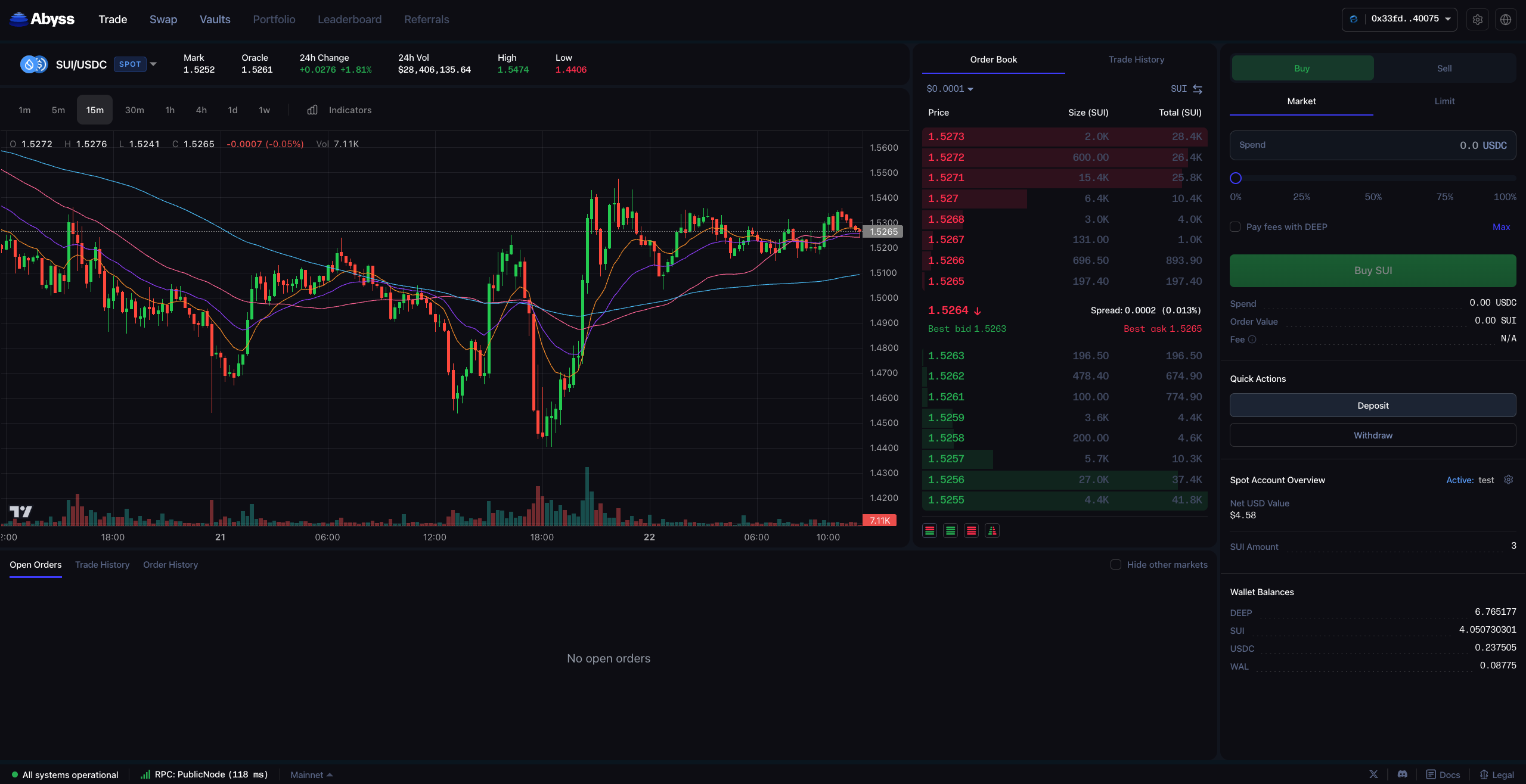
Welcome to the Abyss trading page! Here is a guide on how to use it
Abyss offers two ways to trade:
{% content-ref url="/pages/afVzpJo5cTfkc3fUFWkB" %}
[Spot trading on Abyss](/trading/spot-trading-on-abyss)
{% endcontent-ref %}
{% content-ref url="/pages/FCGYI7xJg9GXdJtPhehr" %}
[Margin trading on Abyss](/trading/margin-trading-on-abyss)
{% endcontent-ref %}
Abyss offers two ways to trade on DeepBook, either using Spot or Margin.
#### Supported Trading Pairs
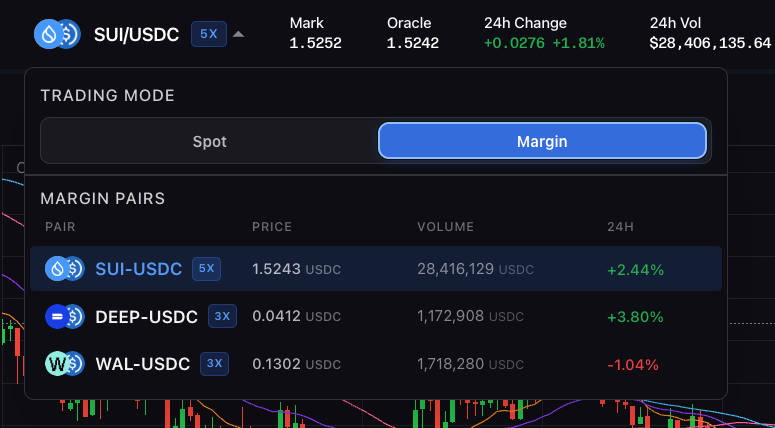
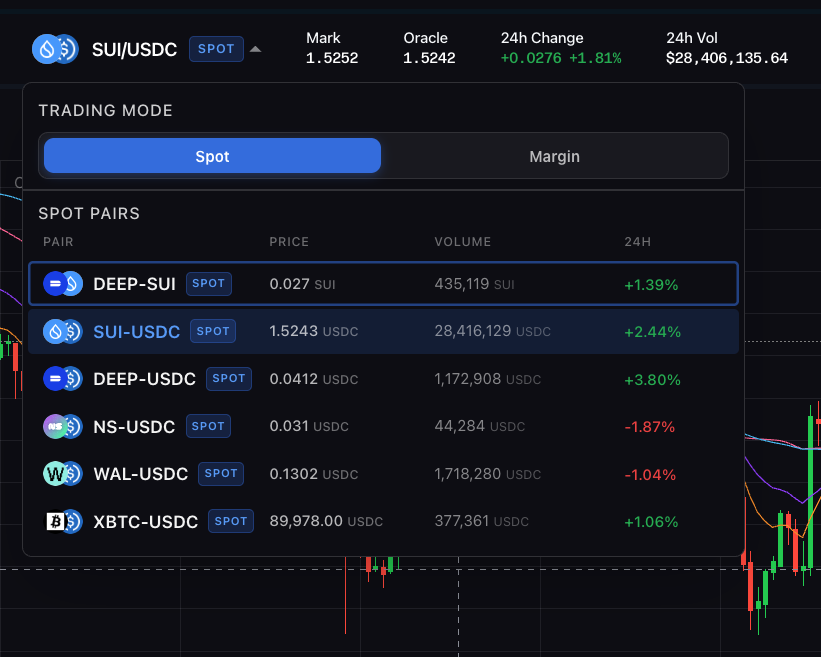
| Pair | Type | Max Leverage |
| --------- | ------------- | ------------ |
| SUI/USDC | Spot & Margin | 5x |
| WAL/USDC | Spot & Margin | 3x |
| DEEP/USDC | Spot & Margin | 3x |
| DEEP/SUI | Spot only | - |
| NS/USDC | Spot only | - |
| XBTC/USDC | Spot only | - |
***
To access margin trading simply click on the trading pair at the top left and select margin, Spot markets have a SPOT tag and margin markets have a max leverage tag e.g. 5X. At launch Abyss offers three margin markets and six spot markets all listed on the app.
# Spot trading on Abyss
Here is a guide to trading Spot on the Abyss protocol.
## Let's dive in
When using Abyss for the first time you will be asked to create a new Balance Manager i.e. a Spot Trading Account.
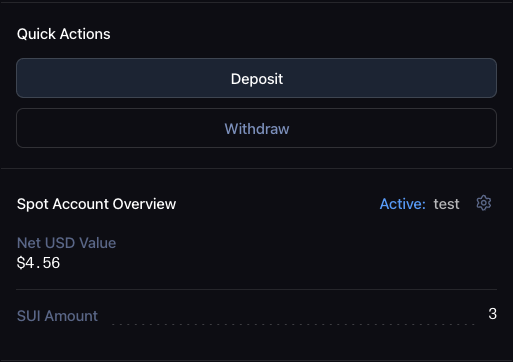
It is the place where you will be depositing and withdrawing funds into in order to place orders. To trade, simply click on deposit and choose directly from your wallet what you wish to trade. After depositing your Spot Account will refresh with the amount of tokens you've just added and the net USD value for that account.
If you want, you can add additional Spot Accounts which are completely isolated from one another or even import others you may have used in the past in the DeepBook ecosystem. To access this, simply click the little settings icon to the right of "Spot Account Overview"
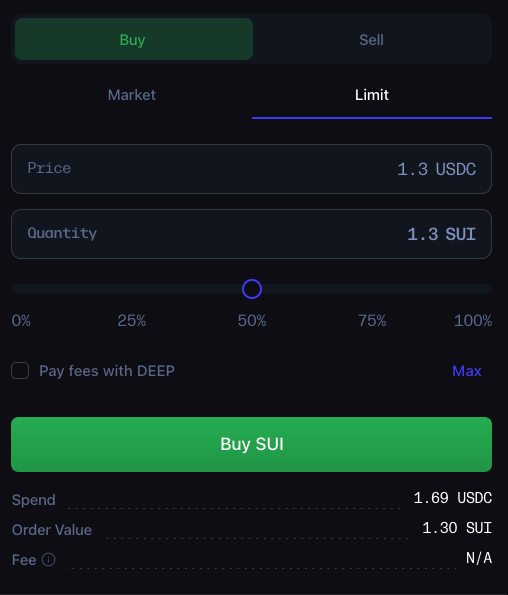
On the right of the spot trading page you will find everything you need to place market and limit orders on Abyss. Simply select Buy or Sell depending on the direction you wish to trade and market or limit. You can choose to pay DeepBook's fees with DEEP and save 25% on the amount of fees you pay.
To place a limit order simply choose the price at which you want to buy or sell and the amount.
{% hint style="info" %}
When placing a limit buy order if the price you set is above the current market price your order will execute immediately as a taker order (i.e. will not rest on the book). Equivalently if you place a limit sell order under the current mark price the order will execute immediately. In both cases they execute at the best bid / best ask regardless of the price you set.
{% endhint %}
Once your limit order is placed it will rest on the book and appear in the open orders section of the trading page shown below. You can modify that order by reducing the amount in the order or cancel the order entirely. You can also cancel all the open orders at once.
In the trade history section you will see a history of all the taker trades that have executed. This includes market orders and filled limit orders. Basically anytime you remove liquidity from the book it will show up here.
The order history section shows you a historical view of the limit orders you've placed and if they have been cancelled or filled.
# Margin trading on Abyss
In the following we will explore how to trade on margin on Abyss.
Beyond Spot trading, Abyss also offers Margin trading. Margin allows traders to take on leverage on top of their assets to trade with more than they actually have. This obviously allows traders to potentially make more but they also can lose proportionally more and be at risk of getting liquidated.
### Key Concepts
#### Leverage
Leverage allows you to control a larger position than your deposited collateral would normally allow by borrowing additional funds.
* **1x**: No leverage (trading with only your own capital)
* **3x**: Your position is 3 times your collateral
* **5x**: Your position is 5 times your collateral
**Example**: With $100 collateral and 5x leverage, you can open a $500 position. Profits and losses are amplified by the leverage factor.
#### Margin Manager
A Margin Manager is a smart contract account that:
* Holds your collateral (base assets, quote assets, or DEEP)
* Tracks your borrowed amounts
* Manages your leveraged positions
You can create multiple margin managers to separate different trading strategies.
#### Collateral
Collateral is the assets you deposit to secure your leveraged positions. Acceptable collateral types:
* **Base asset** (e.g., SUI)
* **Quote asset** (e.g., USDC)
* **DEEP tokens**
Your collateral value is calculated in USD equivalent for risk calculations.
#### Risk Ratio
The risk ratio measures the health of your position:
```
Risk Ratio = Collateral Value / Borrowed Amount
```
| Risk Ratio | Status | Action Allowed |
| ---------- | ----------- | ----------------------------- |
| ≥ 2.0 | Healthy | Withdraw freely |
| 1.25 - 2.0 | Moderate | Can borrow more |
| 1.1 - 1.25 | At Risk | Must repay or add collateral |
| ≤ 1.1 | Liquidation | Position closed automatically |
#### Liquidation
If your risk ratio falls below the liquidation threshold, your position will be automatically closed:
| Pair | Liquidation Threshold |
| --------- | --------------------- |
| SUI/USDC | 1.1x |
| WAL/USDC | 1.2x |
| DEEP/USDC | 1.2x |
When liquidated:
* Your position is sold to repay the borrowed amount
* A 2-3% liquidation reward is paid to the liquidator
* Remaining collateral (if any) stays in your margin manager
### Getting Started
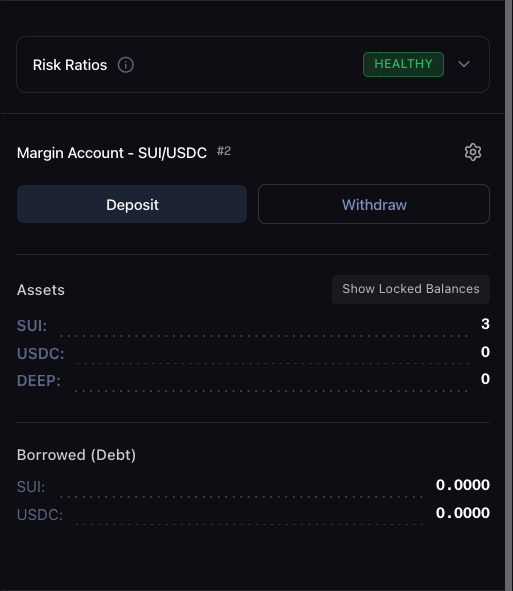
If it's your first time you will be prompted to create a new margin account for the market you've selected. Let's take SUI/USDC for our example. You can deposit one of three assets at a time into your margin account: the base asset (SUI ) the quote asset (USDC) or DEEP (to pay less trading fees). The margin account also shows you the amount of borrowed assets it currently has and the risk ratio dropdown gives you an idea of how healthy the position is and what functions are available to you based on your current risk ratio.
#### Opening a Position TLDR
1. **Select Trading Pair**: Choose your pair from the trading header (e.g., SUI/USDC)
2. **Create or Select a Margin Manager**:
* Use the Margin Manager Selector panel
* Click "Create New" for a fresh margin manager, or
* Select an existing one from the dropdown
3. **Deposit Collateral**:
* Click the deposit button in the order placement panel
* Select your asset type (SUI, USDC, or DEEP)
* Enter the amount and confirm the transaction
4. **Place Your Order**:
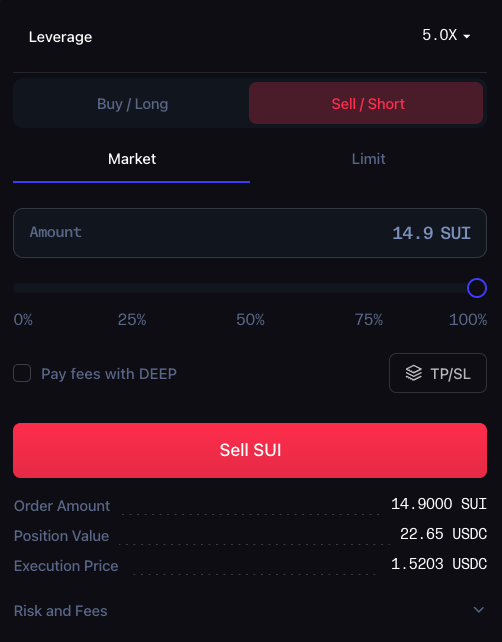
* Select **Buy** (long) or **Sell** (short)
* Choose order type:
* **Market**: Executes immediately at current price
* **Limit**: Executes when price reaches your specified level
* Enter quantity
* Adjust leverage using the slider (1.0x - 5.0x)
* Review the estimated liquidation price
* Click "Place Order" and confirm in your wallet
{% hint style="info" %}
If you wish to go short and long at the same time you will need to create two separate margin accounts for one market although there is not much use to doing this. You cannot borrow the base and quote asset at the same time.
{% endhint %}
{% hint style="info" %}
The amount is automatically calculated based on your margin account balance and the leverage you selected. If you set 1x leverage no assets will be borrowed so it becomes a normal spot trade.
{% endhint %}
When you open the position Abyss automatically borrows the necessary amount and sells or buys based on the direction of the trade (Long or Short). You can choose to unwind the position by clicking to the right of the positions tab (this action sells all of the bought asset for the debt asset and repays the debt to deleverage your position).
If any dust remains you can always repay the leftover debt with the repay debt button in the margin account info.
#### Managing Positions
View your open positions in the **Positions** tab below the chart. Each position shows:
* Entry price
* Current price
* Position size
* Unrealized PNL
* Liquidation price
**Adjusting Collateral**:
* **Add Collateral**: Deposit more assets to increase your risk ratio
* **Withdraw Collateral**: Remove excess collateral (only when risk ratio > 2.0)
#### Closing a Position
**Method 1: Unwind**
* Click "Unwind" on your position
* The system automatically sells to close and repays borrowed amounts
**Method 2: Manual Close**
* Place an opposite order (sell if you're long, buy if you're short)
* Repay any remaining debt using the Repay modal
#### Order Management
**View Orders**: Check the "Open Orders" tab for active orders
**Cancel Orders**:
* Click "Cancel" on individual orders, or
* Use "Cancel All" to cancel all open orders
**Modify Orders**:
* Adjust quantity for limit orders
* Update leverage settings
***
### Limit orders and margin
Limit orders work very similarly to spot with the addition of margin. Your order will sit on the book with borrowed funds waiting to be executed at the predefined price. Once it executes the position will show up in the positions tab.
{% hint style="info" %}
If you cancel a limit order the debt is not automatically repaid so you will need to manually repay the debt after.
{% endhint %}
Trade history and order history work in the same way as for spot trading.
### Risk Management
#### Best Practices
1. **Start with lower leverage**: Begin with 2x or 3x before using maximum leverage
2. **Monitor your risk ratio**: Keep it above 1.5 to avoid liquidation risk
3. **Use stop losses**: Protect against unexpected market moves
4. **Don't over-allocate**: Only trade with funds you can afford to lose
5. **Diversify margin managers**: Separate high-risk and low-risk strategies
#### Understanding Liquidation Risk
Your liquidation price is calculated based on:
* Your entry price
* Position size
* Leverage used
* Collateral deposited
**To avoid liquidation**:
* Add more collateral when risk ratio drops
* Partially close your position
* Set stop losses above liquidation price
#### Position Health Indicators
The interface shows color-coded risk status:
* **Green**: Healthy (risk ratio > 2.0)
* **Yellow**: Moderate (risk ratio 1.5 - 2.0)
* **Orange**: At risk (risk ratio 1.25 - 1.5)
* **Red**: Danger (risk ratio < 1.25)
***
# Margin Risks
This page is copied from https\://docs.sui.io/standards/deepbook-margin/margin-risks
## Margin Risks
URL:
Margin trading amplifies both gains and losses. Before usingDeepBook **DeepBook** A decentralized central limit order book (CLOB) built on Sui. Margin, it's critical to understand the risks involved. This guide explains the key risks and provides concrete examples to help you make informed decisions.
### Liquidation risk
The most significant risk in margin trading is **liquidation** - the forced closure of your position when it becomes too risky for the protocol to maintain.
#### How liquidation works
When you borrow funds to trade, you must maintain a minimum risk ratio (the ratio of your total assets to total debts). If your position's risk ratio falls to or below the **Liquidation Risk Ratio** , anyone can liquidate your position.
Warning Zone For SUI/USDC (5x leverage), when your risk ratio falls between 1.1 and 1.2, you are in the **warning zone** . For WAL/USDC and DEEP/USDC (3x leverage), the warning zone is between 1.2 and 1.3. At these levels, even minor price movements can push you into liquidation. Monitor your position carefully and consider adding collateral or reducing your position size.
#### Partial liquidation
Liquidation inDeepBook Margin is **partial** , not total. The protocol only liquidates enough of your position to restore your risk ratio to the **Target Liquidation Risk Ratio** (1.25 for SUI/USDC, 1.5 for WAL/USDC and DEEP/USDC).
During liquidation:
1. A liquidator repays a portion of your debt (not all of it)
2. They receive collateral plus a liquidation reward (typically 2%)
3. The margin pool also takes a fee (typically 3%)
4. Your position is restored to the target risk ratio
5. You keep the remaining position, but with less equity This means if you're liquidated, you won't lose your entire position. The liquidator repays just enough debt to bring your ratio back to the target, leaving you with a smaller but healthier position.
**However** , if your position is severely underwater (assets barely cover debt plus rewards), a **full liquidation** may occur where all debt is repaid and the lending pool may incur bad debt.
#### Example: Getting liquidated on SUI/USDC
Let's walk through a concrete example using the SUI/USDC trading pair, which has a **Liquidation Risk Ratio of 1.1** .
**Opening position:**
* You deposit **100 USDC** as collateral
* You borrow **400 USDC** and open a 5x long position on SUI at 1.50 USDC per SUI
* Total assets: 500 USDC
* Total debt: 400 USDC
* **Starting risk ratio: 500 / 400 = 1.25**
**The path to liquidation:**
**The path to liquidation:**
| SUI Price (USDC) | SUI Value (USDC) | Total Assets (USDC) | Risk Ratio | Status |
| ---------------- | ---------------- | ------------------- | ---------- | -------------------------- |
| 1.50 | 400 | 500 | 1.25 | Safe (at min borrow ratio) |
| 1.425 | 380 | 480 | 1.20 | Warning zone |
| 1.35 | 360 | 460 | 1.15 | Danger zone |
| 1.275 | 340 | 440 | 1.10 | **Liquidatable** |
| 1.20 | 320 | 420 | 1.05 | Underwater |
**What happens at 1.275 USDC per SUI:**
* Your risk ratio hits 1.1 (the liquidation threshold for SUI/USDC)
* Your position can now be liquidated by anyone
* A liquidator partially liquidates your position, repaying enough debt to restore your risk ratio to 1.25
* You pay liquidation rewards (5% total: 2% to liquidator, 3% to pool)
* Your remaining position has a 1.25 risk ratio, but with significantly less equity and smaller size **Key insight:** With 5x leverage, a mere **15% adverse price movement** can trigger liquidation. Without leverage, you'd simply be down 15% on paper.
#### Liquidation is immediate
Unlike traditional margin calls that give you time to add collateral, DeFi liquidations happen instantly:
* There's no grace period to deposit more funds
* Once your ratio hits the threshold, any liquidator can execute immediately
* You cannot cancel or prevent it once it's triggered
* While partial liquidation preserves some of your position, the equity loss from fees is permanent
#### Leverage multiplies losses (and gains)
Cryptocurrency prices are highly volatile. Leverage amplifies this volatility on your equity, whether you're long or short.
| Leverage | 10% Adverse Move | 20% Adverse Move | 30% Adverse Move |
| ---------------- | ---------------- | ---------------- | ---------------- |
| 1x (no leverage) | -10% equity | -20% equity | -30% equity |
| 2x | -20% equity | -40% equity | -60% equity |
| 3x | -30% equity | -60% equity | -90% equity |
| 5x | -50% equity | Liquidated | Liquidated |
An "adverse move " means:
* **Long positions** : Price moves down (you borrowed USDC to buy SUI, and SUI drops)
* **Short positions** : Price moves up (you borrowed SUI to sell for USDC, and SUI rises) With 5x leverage:
* A 10% adverse price movement = 50% loss on your equity
* A 15-20% adverse price movement = liquidation territory Crypto markets canmove 10-20% in hours. Flash crashes, short squeezes, exchange outages, or major news events can trigger rapid price movements that liquidate leveraged positions before you can react.
### Interest rate risk
When you borrow funds, you pay interest that accrues continuously. This interest is **variable** and can change significantly based on pool utilization.
#### How interest rates fluctuate
DeepBook Margin uses a kinked interest rate model where rates increase gradually up to an optimal utilization point, then spike dramatically.
**Current USDC pool parameters:**
| Utilization | Interest Rate (APR) |
| ------------- | ------------------- |
| 0% | 0% |
| 50% | 7.5% |
| 80% (optimal) | 12% |
| 85% | 37% |
| 90% (max) | 62% |
#### Example: Interest rate spike
Imagine you open a leveraged position expecting to pay \~12% APR (at 80% utilization):
1. **Day 1:** Pool utilization is 75%, you're paying \~11% APR
2. **Day 3:** A large borrower enters, pushing utilization to 85%
3. **Your rate jumps to 37% APR** - more than 3x what you expected
4. **Day 7:** Utilization hits 89%, your rate is now \~57% APR On a 400 USDC borrow:
* At 12% APR: \~0.13 USDC/day in interest
* At 57% APR: \~0.62 USDC/day in interest Over a month, this difference compounds significantly and can erode your position's equity even if prices don'tmove against you.
#### Interest compounds your liquidation risk
Interest accrues to your debt, which means:
* Your total debt increases over time
* Your risk ratio decreases even if asset prices stay flat
* Long-term leveraged positions can drift toward liquidation purely from interest **Example:** Starting with a 1.25 risk ratio and 37% APR interest:
* After 30 days, approximately 3% is added to your debt
* Risk ratio drops from 1.25 to \~1.21
* You're now closer to liquidation without any price movement
### Oracle risk
DeepBook Margin uses Pyth price oracles to value your assets and debts. While the protocol includes several protections, some oracle-related risks remain:
* **Price delays:** Oracle prices may lag behind real market prices during extremely volatile periods. The protocol mitigates this by rejecting prices older than around 60 seconds, but brief delays within this window can still occur.
* **Price manipulation:** Although Pyth is designed to be manipulation-resistant andDeepBook validates prices against confidence intervals and EWMA (exponentially weighted moving average) prices, extreme market conditions could still affect price accuracy.
#### Oracle protections
DeepBook Margin implements multiple safeguards against oracle issues:
* **Staleness protection:** Prices older than around 60 seconds are automatically rejected, preventing liquidations based on stale data
* **Confidence interval checks:** The protocol validates that Pyth price confidence intervals are within acceptable bounds
* **EWMA price verification:** Spot prices are validated against EWMA prices to detect and reject anomalous price spikes
### Risk mitigation strategies
#### 1. Use less than maximum leverage
Just because you can borrow at 5x doesn't mean you should. Consider:
* Using 2-3x leverage instead of 5x
* This gives you more room for price fluctuations before liquidation
#### 2. Monitor your risk ratio actively
* Check your position regularly, especially during volatile markets
* Set up alerts if possible
* Know your liquidation price
#### 3. Use Take Profit / Stop Loss orders
DeepBook Margin supports TPSL orders that automatically close your position:
* Set a stop loss above your liquidation price
* This exits your position with a smaller loss rather than getting liquidated
#### 4. Maintain collateral reserves
* Keep additional funds ready to deposit if your position approaches liquidation
* Remember that adding collateral improves your risk ratio
#### 5. Understand the interest rate environment
* Check current pool utilization before borrowing
* Be prepared for rates to increase
* Factor interest costs into your position sizing
#### 6. Start small
If you're new to margin trading:
* Start with small position sizes
* Learn how the system works with money you can afford to lose
* Gradually increase size as you gain experience
### Summary of key risks
| Risk | What Can Happen | How to Mitigate |
| -------------- | ------------------------------------------------------------------------------ | ----------------------------------------------------- |
| Liquidation | Price volatility causes position to be forcibly closed, lose collateral + fees | Use less leverage, set stop losses, monitor positions |
| Interest rates | Borrowing costs spike unexpectedly | Check utilization, factor in rate variability |
| Oracle risk | Prices may not reflect true market | Understand oracle mechanics, avoid extreme leverage |
### Related links
• Risk Ratio Detailed explanation of risk ratios and liquidation thresholds.
• Interest Rates How borrow interest rates are calculated.
• Take Profit / Stop Loss Set up automated orders to manage risk.
• Contract Information View current risk parameters for all trading pairs.
# Swap
#### Using the Swap Page
The Swap page offers two modes:
**Aggregator Mode** (Default):
* Routes through 7K Aggregator for best rates
* Compares prices across multiple DEXs
* Optimal for larger trades
**DeepBook Mode**:
* Direct swaps through DeepBook order book
* 20% fee discount when paying with DEEP tokens
**Placing a Swap**:
1. Select your input token and amount
2. Select your output token
3. Review the rate and slippage
4. Adjust slippage tolerance if needed (default: 0.5%)
5. Click "Swap" and confirm
**Limit Orders**:
1. Switch to "Limit" tab
2. Set your desired price
3. Enter amount
4. Place the order (executes when price is reached)
***
# Vaults and aTokens
### Vaults
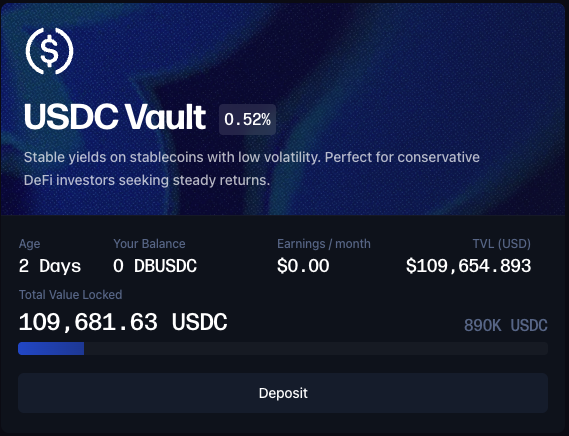
Vaults allow you to supply liquidity and earn yield from margin traders' borrowing fees.
#### Available Vaults
| Vault | Supply Cap | Purpose |
| ----- | --------------- | --------------------------- |
| SUI | 500,000 SUI | Lend SUI to margin traders |
| USDC | 1,000,000 USDC | Lend USDC to margin traders |
| DEEP | 20,000,000 DEEP | Lend DEEP to margin traders |
| WAL | 7,000,000 WAL | Lend WAL to margin traders |
#### Depositing to a Vault
1. Navigate to the **Vaults** page
2. Select a vault
3. Click "Deposit"
4. Enter the amount you wish to supply
5. Confirm the transaction
#### Withdrawing from a Vault
1. Navigate to the **Vaults** page
2. Select the vault with your deposit
3. Click "Withdraw"
4. Enter the amount to withdraw
5. Confirm the transaction
#### Earnings
* Interest accumulates in real-time based on borrowing demand
* Higher utilization = higher APY for suppliers
* Earnings are automatically compounded
***
# Developer reference
## Abyss Vaults and ATokens
You can find the contracts repository here
### Table of Contents
* Overview
* Architecture
* Core Components
* Vault Registry
* Vault
* Vault Supply
* Vault Withdrawal
* Vault Incentives
### Overview
Abyss vaults allow depositors to earn interest on their assets by lending liquidity to DeepBook margin traders, while holding their share of the vault in a fungible way. Users deposit supported assets, receive yield-bearing ATokens that track their proportional claim, and benefit from automated compounding of incentives. Users can then use their ATokens freely across the DeFi ecosystem.
### Architecture
### Core Components
#### [Vault Registry](https://github.com/abyss-protocol/abyss-vaults/blob/main/sources/vault_registry.move)
Manages vault registration, package versioning, and vault-specific permissions. Enforces one vault per underlying asset type. Enables admins to enable or disable a package version. Verifies the validity of `VaultManagerCap` and `IncentiveManagerCap`.
One can retrieve the vault identifier based on the underlying asset type using the public function:
```move
public fun vault_id(registry: &VaultRegistry): ID
```
#### [Vault](https://github.com/abyss-protocol/abyss-vaults/blob/main/sources/vault.move)
The Abyss Vault manages core user operations. It handles user deposits and withdrawals, issues ATokens, synchronizes with the underlying margin pool, and manages incentive compounding.
**Vault Supply**
```move
public fun supply(
vault: &mut Vault,
margin_pool: &mut MarginPool,
vault_registry: &VaultRegistry,
margin_registry: &MarginRegistry,
supply: Coin,
abyss_supplier_cap: &AbyssSupplierCap,
referral: Option,
clock: &Clock,
ctx: &mut TxContext,
): Coin
```
The vault supply takes assets and mints the corresponding amount of ATokens, representing shares in the total value of the vault. Yield is redistributed proportionally to the number of shares held. Integrators of Abyss vaults can set the referral parameter to their `SupplyReferral` object ID to earn referral fees.
**Vault Withdrawal**
```move
public fun withdraw(
vault: &mut Vault,
margin_pool: &mut MarginPool,
vault_registry: &VaultRegistry,
margin_registry: &MarginRegistry,
withdraw: Coin,
abyss_supplier_cap: &AbyssSupplierCap,
clock: &Clock,
ctx: &mut TxContext,
): Coin
```
The vault withdrawal burns the given amount of ATokens and returns the corresponding amount of assets to the user. Withdrawals honor a first-in, first-out accounting model—if the vault is mid-cycle on incentive compounding, the contract checkpoints earnings before transferring funds to guarantee everyone receives their share.
### Package Addresses
#### Mainnet
**Package**
| Name | Version | Chain | Address |
| ------------ | ------- | ----------- | -------------------------------------------------------------------- |
| Abyss Vaults | 1 | Sui Mainnet | `0x90a75f641859f4d77a4349d67e518e1dd9ecb4fac079e220fa46b7a7f164e0a5` |
**Objects**
| Name | Version | Chain | Object ID |
| ------------------ | ------- | ----------- | -------------------------------------------------------------------- |
| Vault Registry | 1 | Sui Mainnet | `0xfac1800074e8ed8eb2baf1e631e8199ccce6b0f6bfd50b5143e1ff47c438aecf` |
| Abyss Supplier Cap | 1 | Sui Mainnet | `0x3d0faab3953525d243275b39cbed465cb310fe2d4dd2c15428b8f7cf5962c2c0` |
**Vaults**
| Asset | Vault ID | Margin Pool ID |
| ----- | -------------------------------------------------------------------- | -------------------------------------------------------------------- |
| SUI | `0x670c12c8ea3981be65b8b11915c2ba1832b4ebde160b03cd7790021920a8ce68` | `0x53041c6f86c4782aabbfc1d4fe234a6d37160310c7ee740c915f0a01b7127344` |
| DEEP | `0xec54bde40cf2261e0c5d9c545f51c67a9ae5a8add9969c7e4cdfe1d15d4ad92e` | `0x1d723c5cd113296868b55208f2ab5a905184950dd59c48eb7345607d6b5e6af7` |
| WAL | `0x09b367346a0fc3709e32495e8d522093746ddd294806beff7e841c9414281456` | `0x38decd3dbb62bd4723144349bf57bc403b393aee86a51596846a824a1e0c2c01` |
| USDC | `0x86cd17116a5c1bc95c25296a901eb5ea91531cb8ba59d01f64ee2018a14d6fa5` | `0xba473d9ae278f10af75c50a8fa341e9c6a1c087dc91a3f23e8048baf67d0754f` |
**ATokens**
| Asset | Type | Icon URL |
| ------ | ------------------------------------------------------------------------------------------------------------------------------------------------------------------------- | ------------------------------------------------ |
| aSUI | `0x90a75f641859f4d77a4349d67e518e1dd9ecb4fac079e220fa46b7a7f164e0a5::abyss_vault::AToken<0x2::sui::SUI>` | |
| DBUSDC | `0x90a75f641859f4d77a4349d67e518e1dd9ecb4fac079e220fa46b7a7f164e0a5::abyss_vault::AToken<0xdba34672e30cb065b1f93e3ab55318768fd6fef66c15942c9f7cb846e2f900e7::usdc::USDC>` | |
| aDEEP | `0x90a75f641859f4d77a4349d67e518e1dd9ecb4fac079e220fa46b7a7f164e0a5::abyss_vault::AToken<0xdeeb7a4662eec9f2f3def03fb937a663dddaa2e215b8078a284d026b7946c270::deep::DEEP>` | |
| aWAL | `0x90a75f641859f4d77a4349d67e518e1dd9ecb4fac079e220fa46b7a7f164e0a5::abyss_vault::AToken<0x356a26eb9e012a68958082340d4c4116e7f55615cf27affcff209cf0ae544f59::wal::WAL>` | |
### Typescript reference
```typescript
// ============================================================================
// Transaction Building Functions
// ============================================================================
/**
* Build deposit transaction
*
* @param params - Deposit parameters
* @param userAddress - User's wallet address
* @param env - Environment (mainnet or testnet)
* @returns Transaction object ready to be signed
*/
export function buildDepositTransaction(
params: DepositParams,
userAddress: string,
env: Environment = "mainnet",
coinIds?: string[],
): Transaction {
const packageId = getVaultPackageId(env);
const vaultRegistryId = getVaultRegistryId(env);
const marginRegistryId = getMarginRegistryId(env);
const supplierCapId = getSupplierCapId(env);
const tx = new Transaction();
let depositCoin;
// Check if this is a SUI vault or another asset
const isSuiVault = params.assetType === "0x2::sui::SUI";
if (isSuiVault) {
// For SUI vaults, split from gas
const [coin] = tx.splitCoins(tx.gas, [tx.pure.u64(params.amount)]);
depositCoin = coin;
} else {
// For non-SUI vaults, we need to use provided coin IDs
if (!coinIds || coinIds.length === 0) {
throw new Error("Coin IDs required for non-SUI vault deposits");
}
// Merge all coins if multiple
let primaryCoin;
if (coinIds.length === 1) {
primaryCoin = tx.object(coinIds[0]);
} else {
const [firstCoin, ...restCoins] = coinIds;
tx.mergeCoins(
tx.object(firstCoin),
restCoins.map((id) => tx.object(id)),
);
primaryCoin = tx.object(firstCoin);
}
// Split the exact amount needed
const [coin] = tx.splitCoins(primaryCoin, [tx.pure.u64(params.amount)]);
depositCoin = coin;
}
// Determine the appropriate referral address based on asset type
let optionAddress: string;
if (params.assetType.includes("::deep::")) {
// DEEP token address
optionAddress = "0x434c4d10328fe29206ae4c7a42869b07a4eb4619a48b8e502604287417fea220";
} else if (params.assetType.includes("::wal::")) {
// WAL token address
optionAddress = "0xb29d0f48cacbee7be4dab1524a0f995f41f33bd5fdb05492f69af85738dc6c56";
} else if (params.assetType.includes("::usdc::")) {
// USDC token address
optionAddress = "0xba436b3f0e57600e9318c2e03c51b940612d8b0d4df18ad9f31c203f95cad122";
} else if (params.assetType === "0x2::sui::SUI") {
// SUI token address
optionAddress = "0x695b391423801750827e0b99792a7cd5e41bee3d90b2af03fc99197938c6c98d";
} else {
throw new Error("Unsupported asset type for deposit: " + params.assetType);
}
// Call deposit function
const [atokenCoin] = tx.moveCall({
target: `${packageId}::abyss_vault::supply`,
arguments: [
tx.object(params.vaultId),
tx.object(params.marginPoolId),
tx.object(vaultRegistryId),
tx.object(marginRegistryId),
depositCoin,
tx.object(supplierCapId),
tx.pure.option("id", optionAddress),
tx.object(CLOCK_ID),
],
typeArguments: [params.assetType, params.atokenType],
});
// Transfer ATokens to user
tx.transferObjects([atokenCoin], userAddress);
return tx;
}
/**
* Build withdraw transaction
*
* @param params - Withdraw parameters
* @param userAddress - User's wallet address
* @param env - Environment (mainnet or testnet)
* @returns Transaction object ready to be signed
*/
export function buildWithdrawTransaction(
params: WithdrawParams,
userAddress: string,
env: Environment = "mainnet",
): Transaction {
const packageId = getVaultPackageId(env);
const vaultRegistryId = getVaultRegistryId(env);
const marginRegistryId = getMarginRegistryId(env);
const supplierCapId = getSupplierCapId(env);
const tx = new Transaction();
// If multiple AToken coins, merge them first
let atokenCoin;
if (params.atokenCoinIds.length === 1) {
atokenCoin = tx.object(params.atokenCoinIds[0]);
} else if (params.atokenCoinIds.length > 1) {
// Merge all coins into the first one
const [firstCoin, ...restCoins] = params.atokenCoinIds;
tx.mergeCoins(
tx.object(firstCoin),
restCoins.map((id) => tx.object(id)),
);
atokenCoin = tx.object(firstCoin);
} else {
throw new Error("No AToken coins provided for withdrawal");
}
// Split the exact amount to withdraw
const [withdrawCoin] = tx.splitCoins(atokenCoin, [
tx.pure.u64(params.atokenAmount),
]);
// Call withdraw function
const [assetCoin] = tx.moveCall({
target: `${packageId}::abyss_vault::withdraw`,
arguments: [
tx.object(params.vaultId),
tx.object(params.marginPoolId),
tx.object(vaultRegistryId),
tx.object(marginRegistryId),
withdrawCoin,
tx.object(supplierCapId),
tx.object(CLOCK_ID),
],
typeArguments: [params.assetType, params.atokenType],
});
// Transfer withdrawn assets to user
tx.transferObjects([assetCoin], userAddress);
return tx;
}
```
### Resources
* [DeepBook Margin Documentation](https://docs.sui.io/standards/deepbook-margin)
* [Abyss Vaults Move Registry Reference](https://www.moveregistry.com/package/@abyssonsui/abyss-vaults)
# Abyss Audit
Here you will find a link to the Abyss Vault contract audit by Three Sigma
# FAQ
#### General
**Q: Do I need to create a margin manager for spot trading?** A: No, spot trading uses your wallet balance directly. Margin managers are only needed for leveraged trading.
**Q: Can I use multiple margin managers?** A: Yes, you can create multiple margin managers to separate different strategies or trading pairs.
**Q: What happens if I get liquidated?** A: Your position is automatically closed, the borrowed amount is repaid, and a liquidation reward (2-3%) goes to the liquidator. Any remaining collateral stays in your margin manager.
#### Trading
**Q: What's the difference between market and limit orders?** A: Market orders execute immediately at the current price. Limit orders only execute when the market reaches your specified price.
**Q: Can I increase or decrease my position size after opening?** A: Yes, you can place additional orders to increase your position or partially close to reduce it.
**Q: How is PNL calculated?** A: PNL = (Current Price - Entry Price) × Position Size. For short positions, this is inverted.
#### Technical
**Q: Why did my transaction fail?** A: Common reasons include:
* Insufficient wallet balance for gas
* Slippage exceeded (try increasing slippage tolerance)
* Price moved significantly during transaction
* RPC connection issues (try switching RPC endpoints)
**Q: How do I switch RPC endpoints?** A: Click the settings icon near your wallet address and select a different RPC endpoint from the dropdown.
**Q: Where can I get testnet tokens?** A: Use the Sui testnet faucet to receive testnet SUI, then swap for other testnet tokens.
***
### Support
For additional help:
* Visit the Abyss Protocol documentation
* Join the community Discord
* Report issues on Discord or Github
***
*This documentation is for informational purposes only. Trading with leverage involves significant risk. Only trade with funds you can afford to lose.*